Android Integeration with AdMob MediationˍSDK8
詳細範例:
-
AdMob 20.5.0 Mediation Project (包含橫幅、插頁、原生廣告)。

新增應用程式
AdMob網站: https://apps.admob.com/
- 進入 AdMob 網頁選擇 應用程式 > 新增應用程式
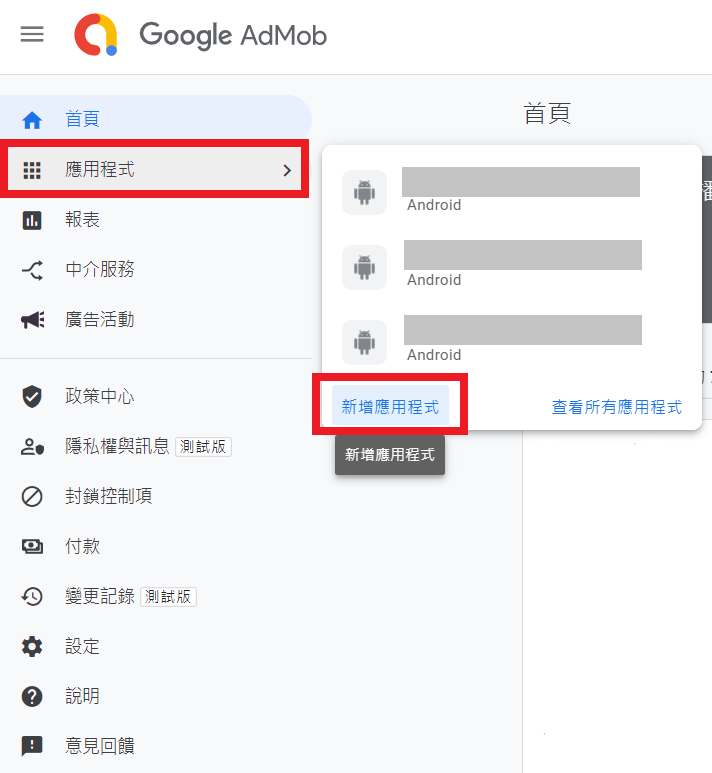
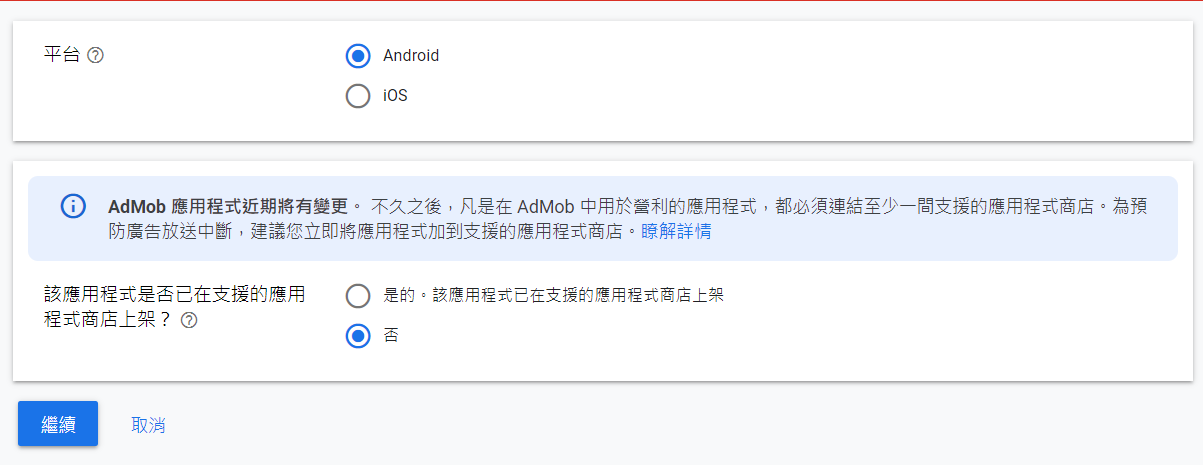
選擇平台
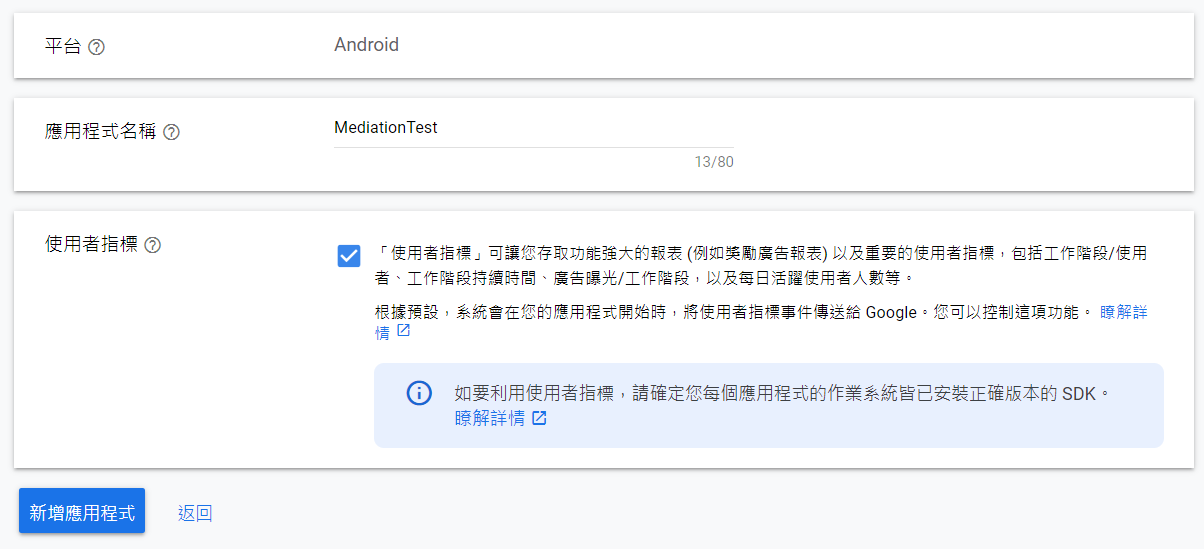
接著輸入應用程式名稱
建立完成
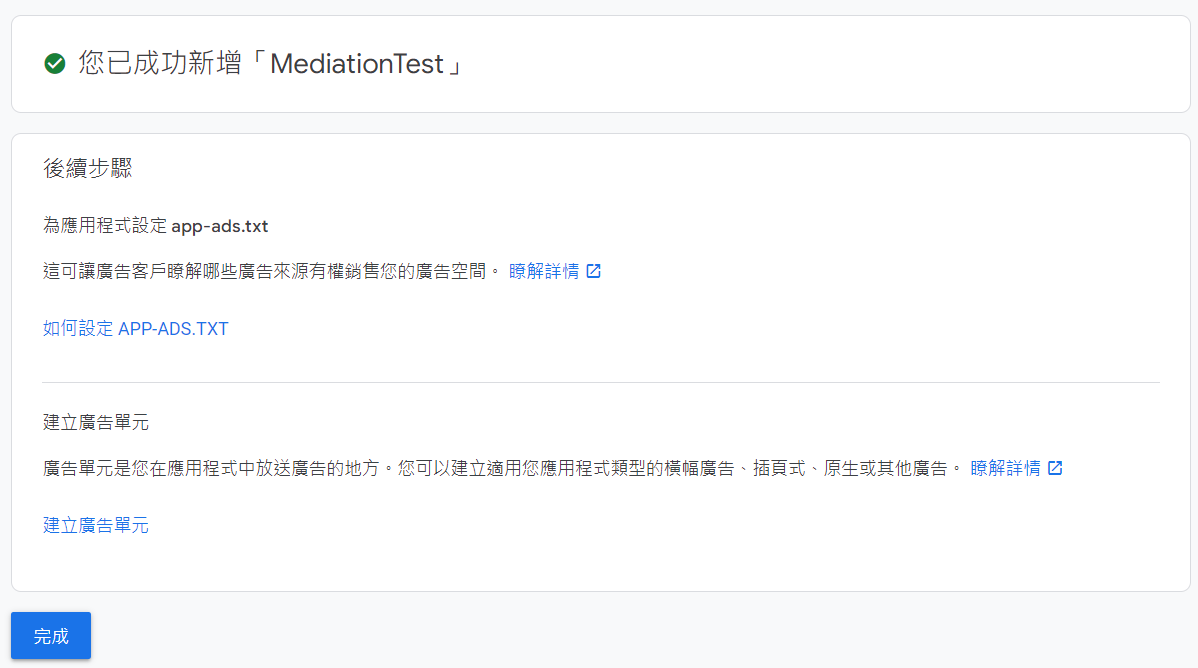
新增廣告單元
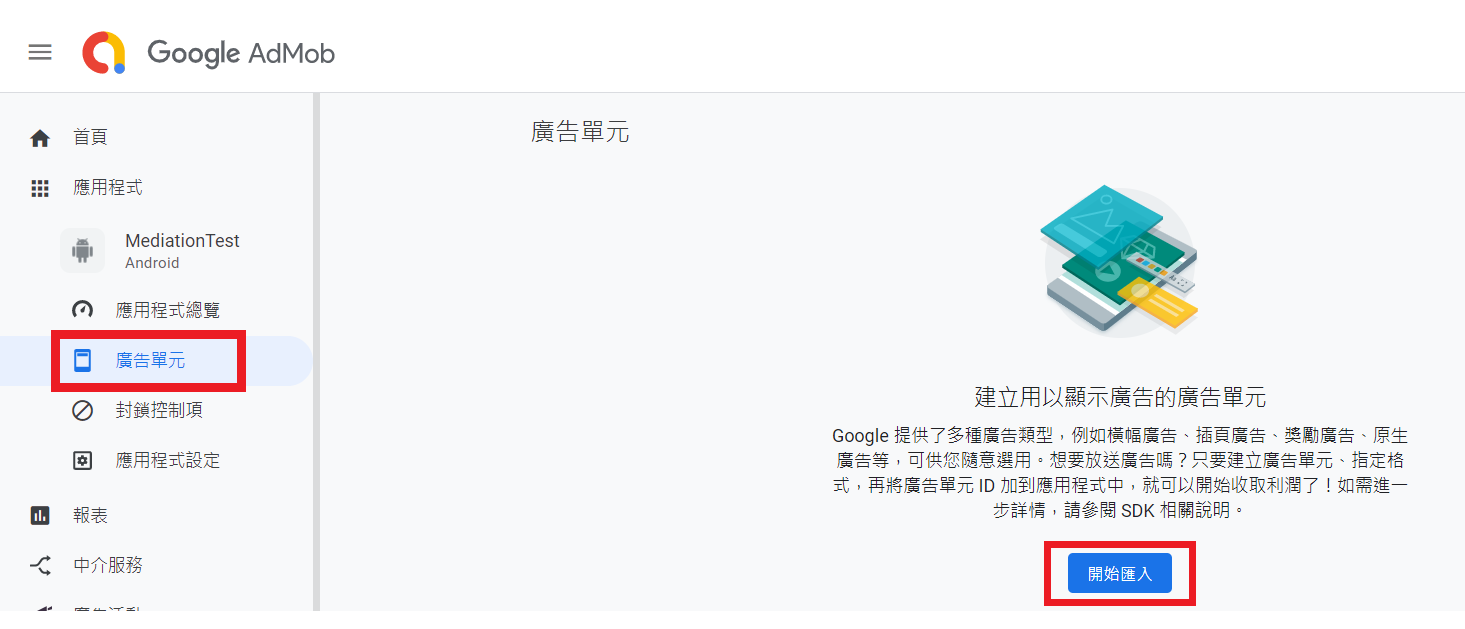
- 點選先前建立的應用程式並選擇 廣告單元 > 開始匯入
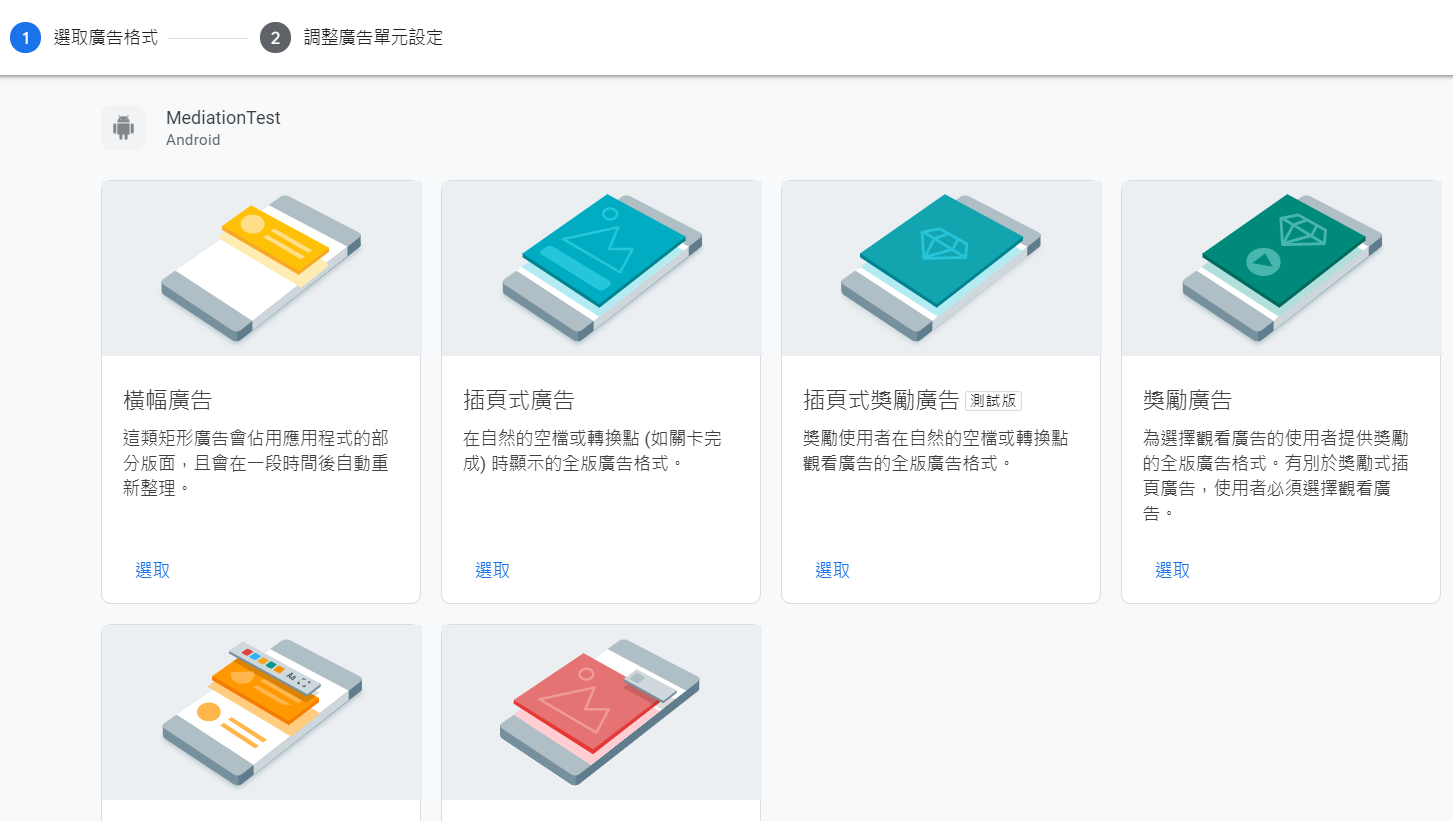
選擇欲建立的廣告單元 (以橫幅廣告為例)
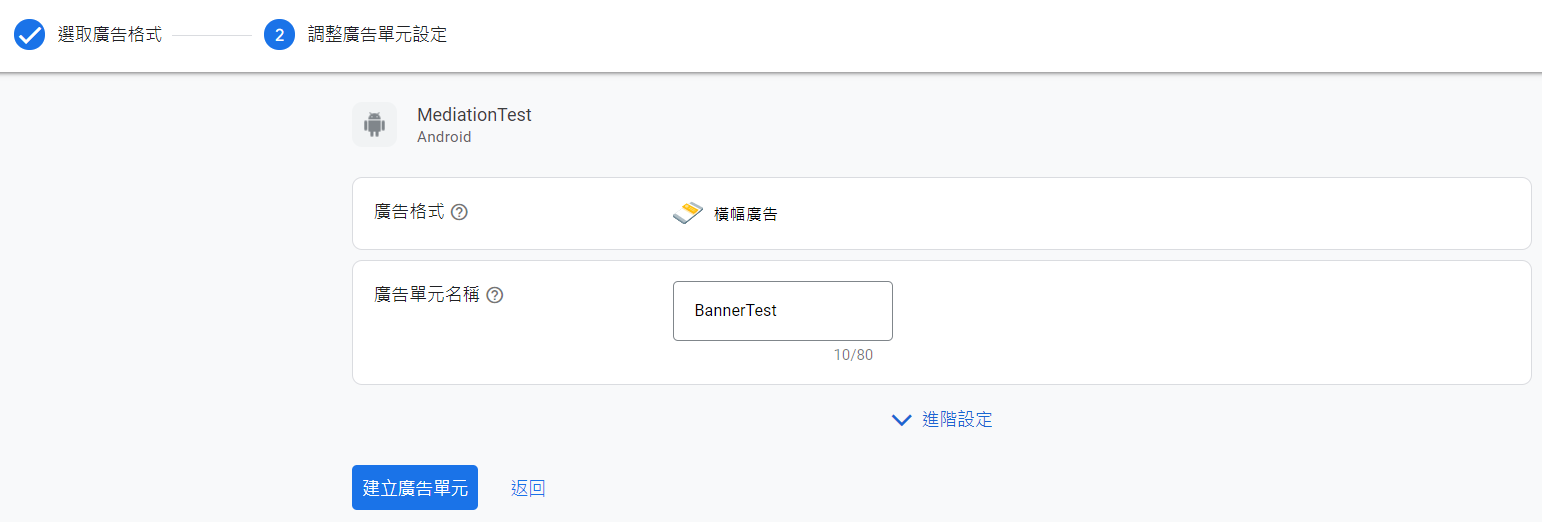
輸入廣告單元名稱
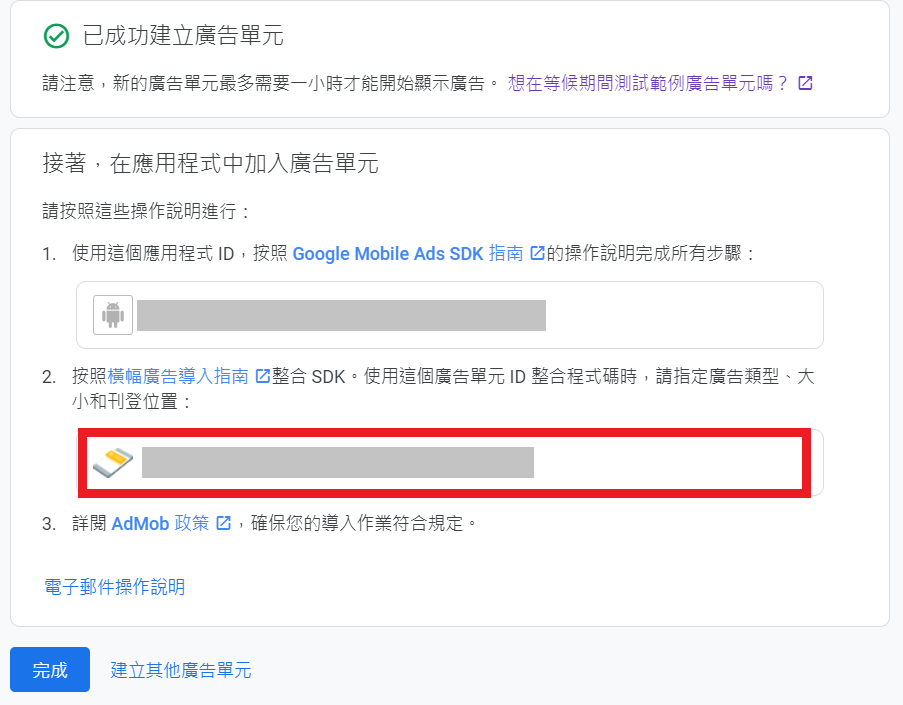
建立完成,請記下 AdMob 的廣告單元ID
新增中介服務群組
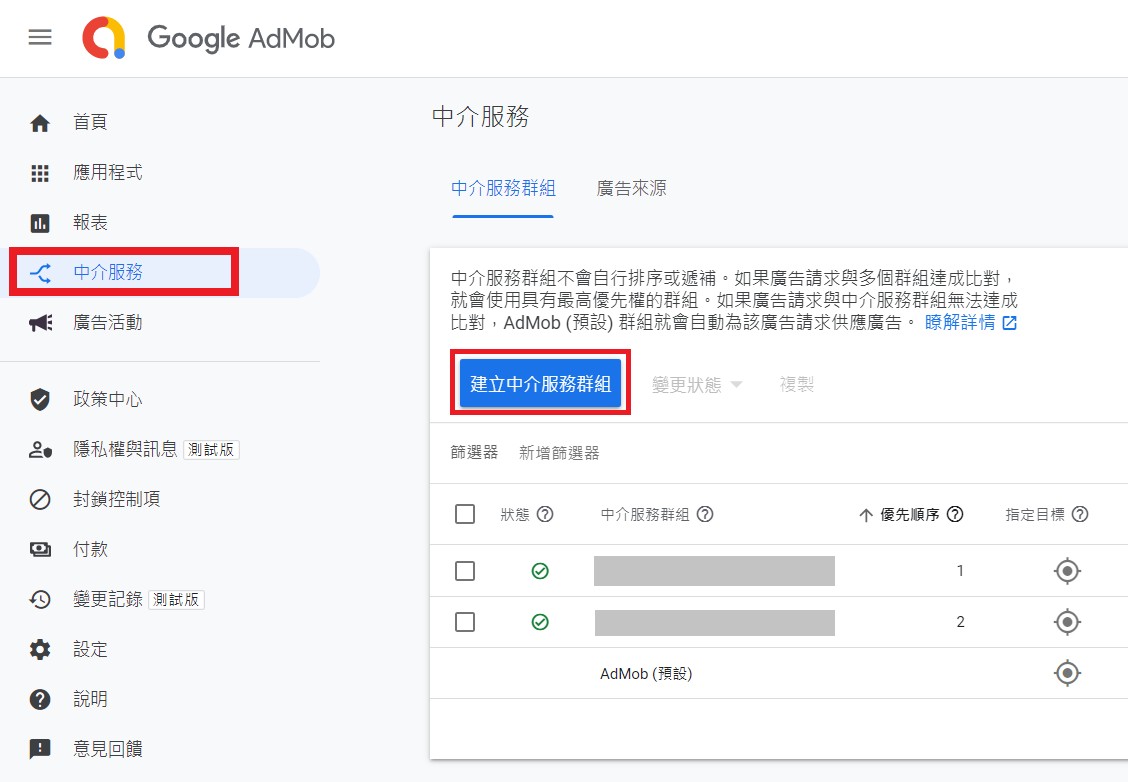
- 進入 AdMob 網頁選擇 中介服務 > 新增中介服務群組
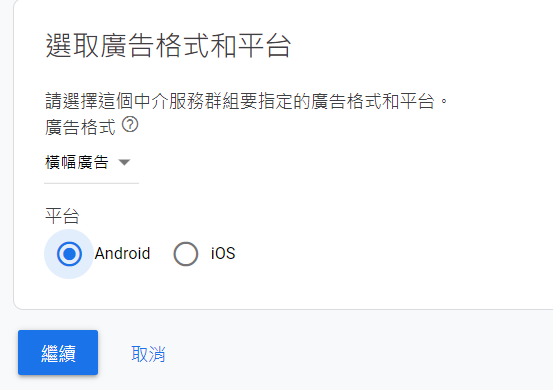
設定廣告格式、平台
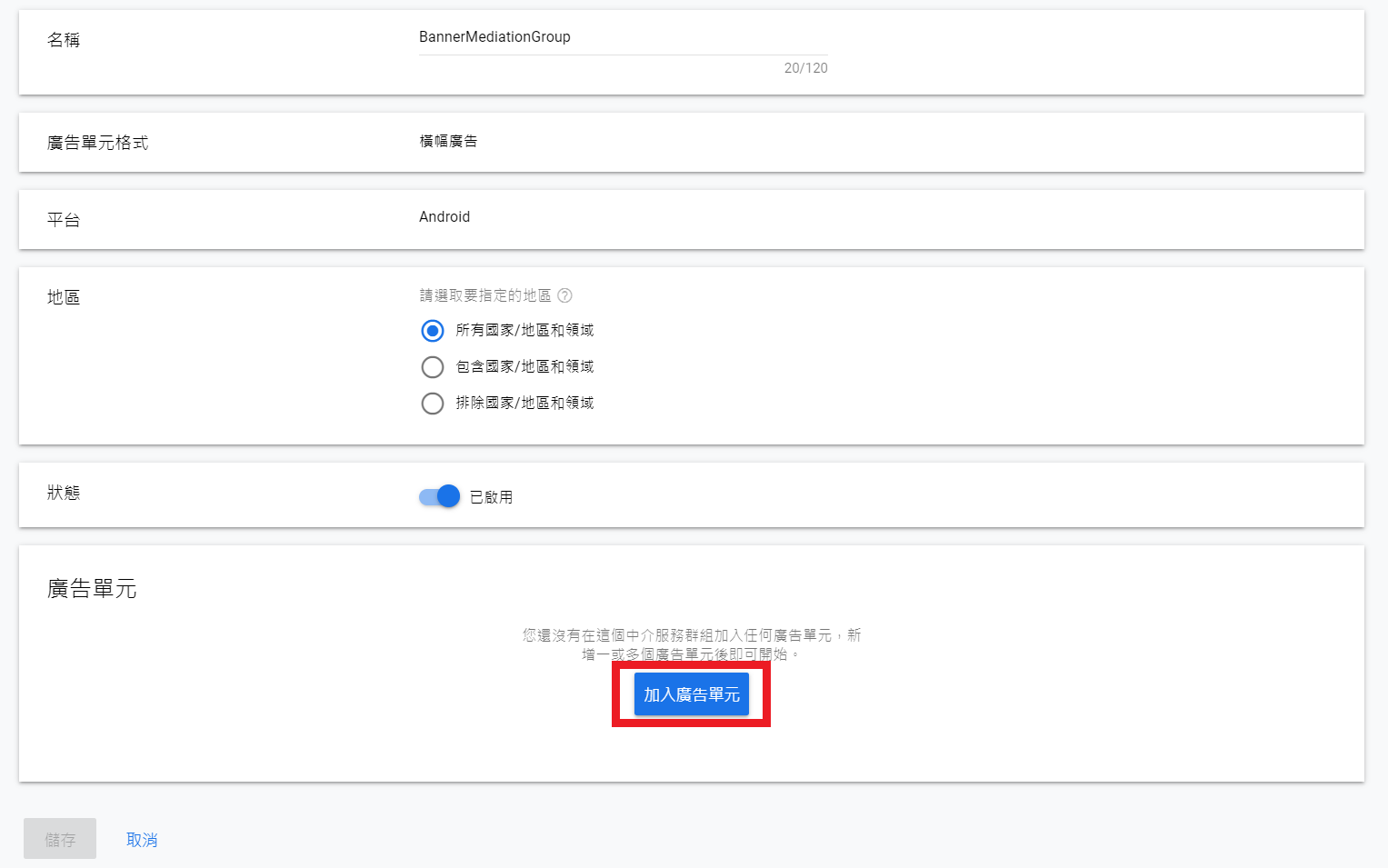
設定中介群組名稱並點選加入廣告單元
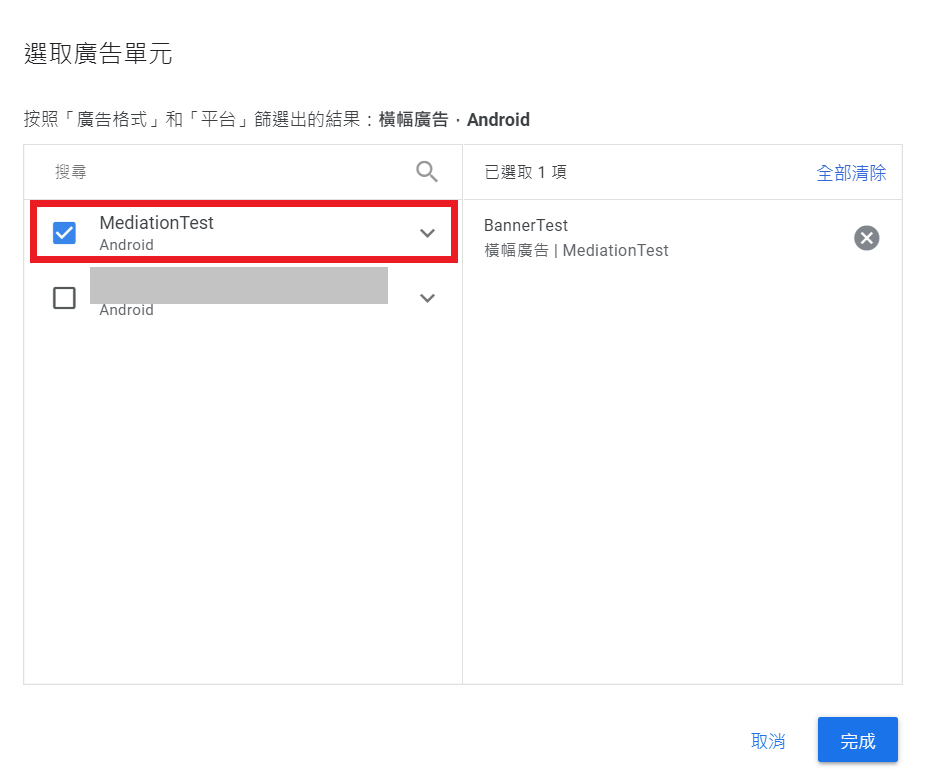
選擇先前建立的廣告單元 (以橫幅廣告為例)
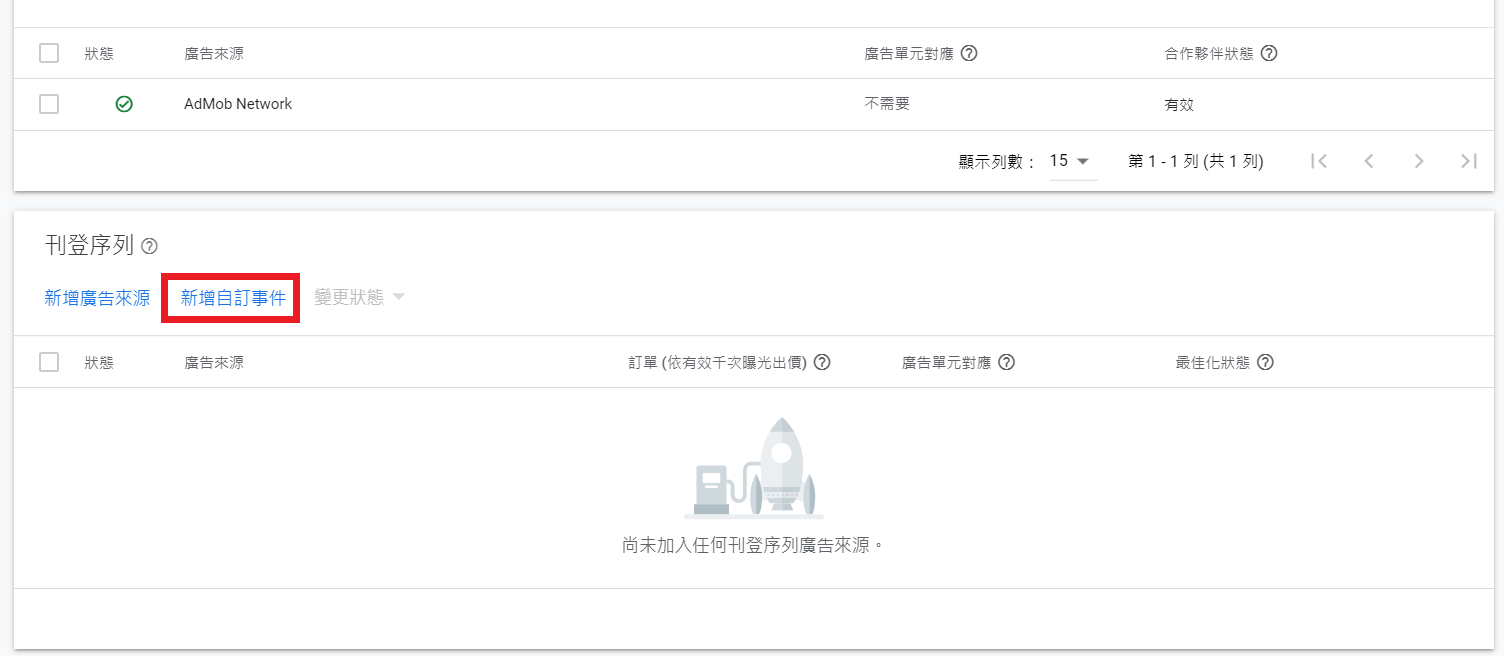
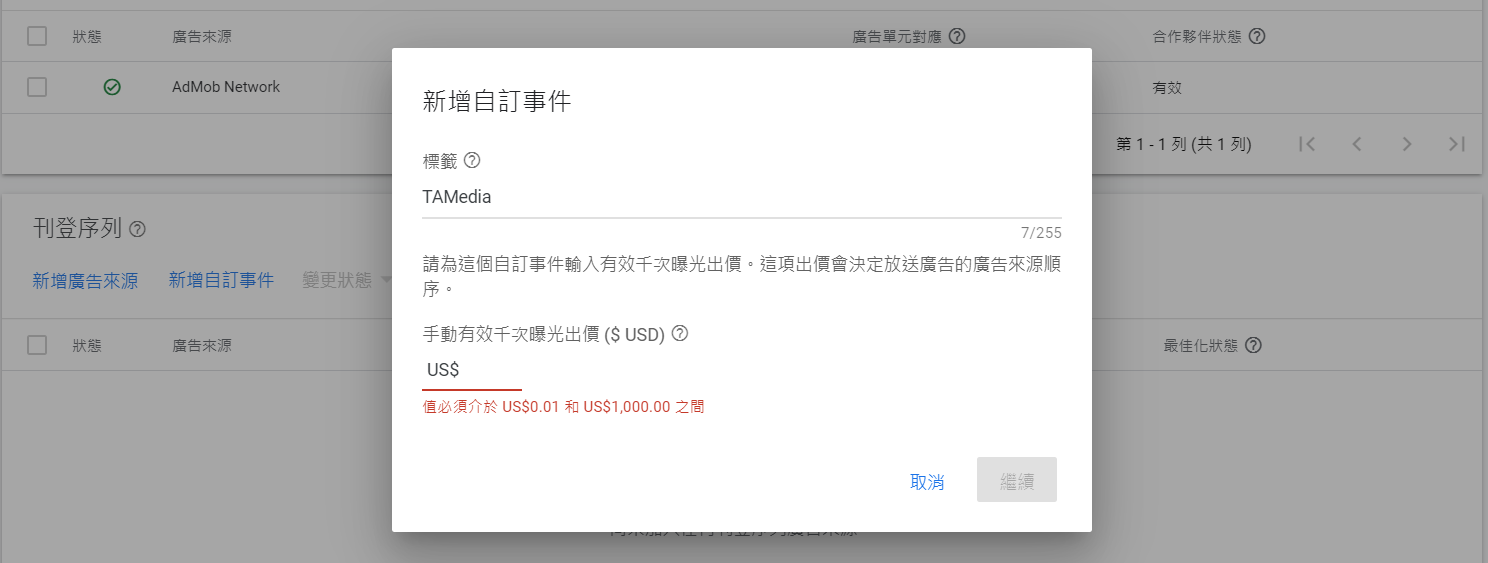
點選新增自訂事件,並設定下列相關資訊:
有效千次曝光出價: 越高代表該家聯播網廣告曝光的機會越高
Class Name: 根據您的專案輸入 mediation code 的 package name,如: com.taiwanmobile.pt.adp.mediation.TAMediaBanner (下方實作 Mediation Code章節會說明Mediation Code的實作方式)
Parameter: 輸入您的 TAmedia 廣告版位ID
TAmedia廣告版位ID
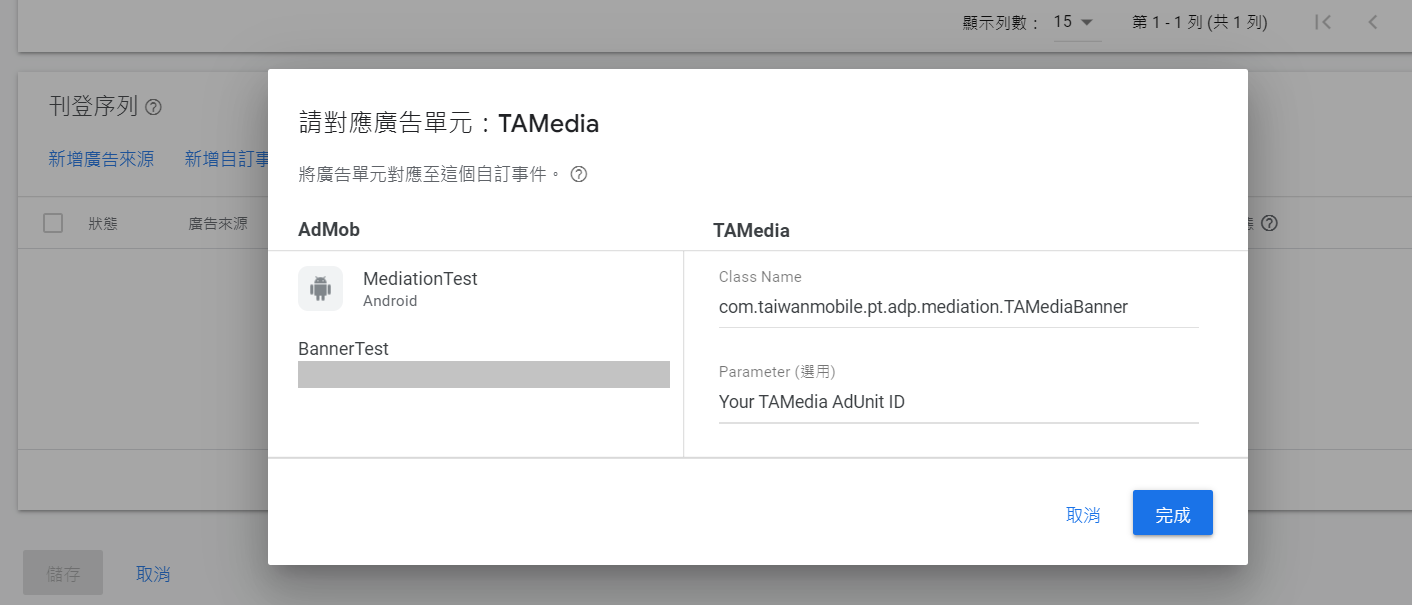
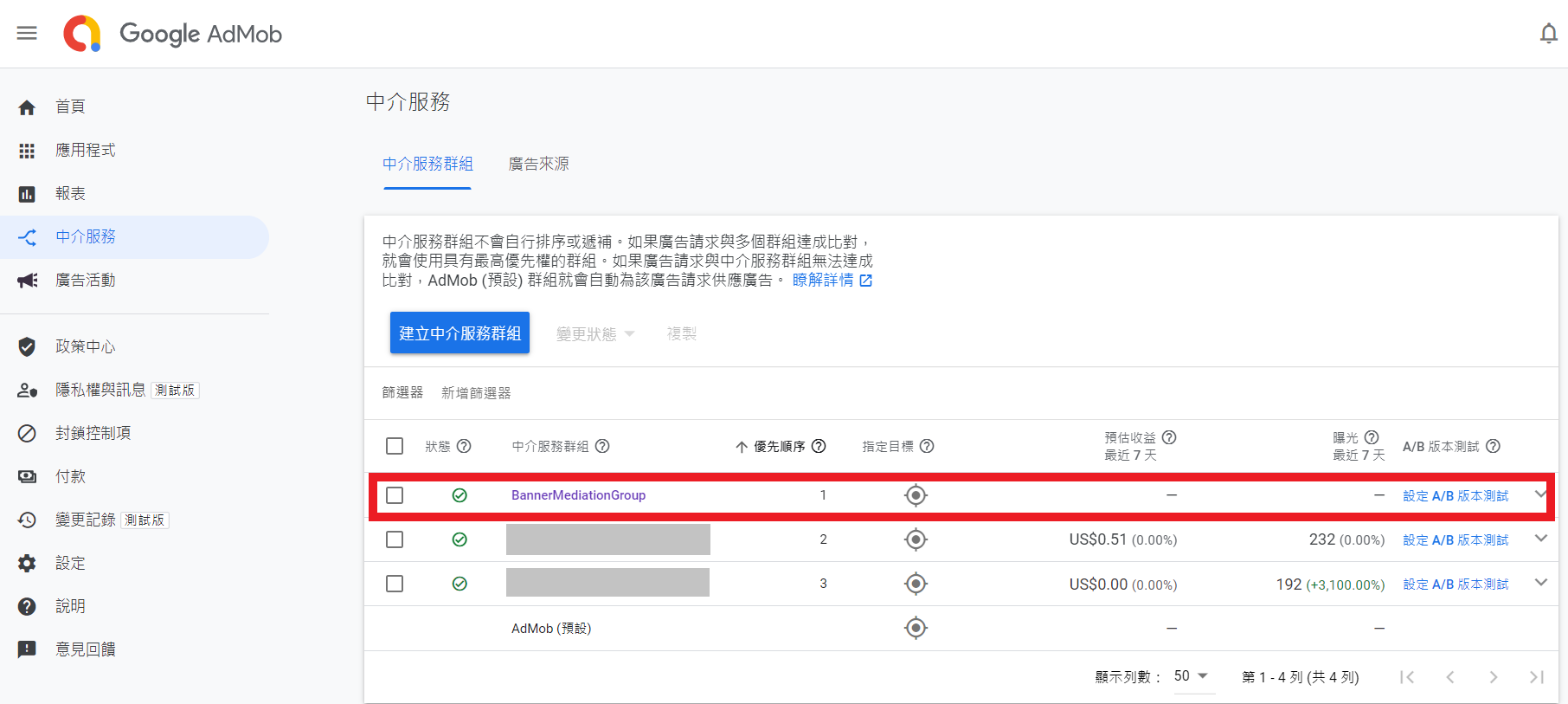
點選完成後,中介服務群組的設置便結束
程式整合
- 1. 請參考AdMob for Android 網站提供的方式整合Google Ads SDK,此步驟會使用到新增應用程式所取得的應用程式ID
- 2. 下載 TAMedia Android SDK,並參考 開始使用Getting Started 整合TAMedia Android SDK
- 2. 下載AdMob 20.5.0 Mediation Project,並整合下列Mediation Code進開發者專案中
Mediation Code
Banner
- 依照下列方式實作AdMob所提供的CustomEventBanner
package com.taiwanmobile.pt.adp.mediation
import android.app.Activity
import android.content.Context
import android.os.Bundle
import android.util.Log
import com.google.android.gms.ads.AdRequest
import com.google.android.gms.ads.AdSize
import com.google.android.gms.ads.mediation.MediationAdRequest
import com.google.android.gms.ads.mediation.customevent.CustomEventBanner
import com.google.android.gms.ads.mediation.customevent.CustomEventBannerListener
import com.taiwanmobile.pt.adp.view.*
// 需將本class的完整類別名稱 com.taiwanmobile.pt.adp.mediation.TAMediaBanner註冊於中介服務群組, 如 新增中介服務群組 所述
class TAMediaBanner : CustomEventBanner {
private var adView: TWMAdView? = null
override fun requestBannerAd(
context: Context,
customEventBannerListener: CustomEventBannerListener,
serverParameter: String?,
adSize: AdSize,
mediationAdRequest: MediationAdRequest,
bundle: Bundle?
) {
// serverParameter: AdMob 後台設定的 TAMedia Slot ID, 會藉由此參數獲得
Log.d(TAG, "requestBannerAd($serverParameter) invoked!!")
adView = TWMAdView(context as Activity, convertAdSize(adSize), serverParameter)
adView?.adListener = object : TWMAdViewListener {
override fun onReceiveAd(ad: TWMAd) {
customEventBannerListener.onAdLoaded(adView)
}
override fun onFailedToReceiveAd(ad: TWMAd, errorCode: TWMAdRequest.ErrorCode) {
customEventBannerListener.onAdFailedToLoad(
convertErrorCode(errorCode)
)
}
override fun onPresentScreen(ad: TWMAd) {
customEventBannerListener.onAdOpened()
}
override fun onDismissScreen(ad: TWMAd) {
customEventBannerListener.onAdClosed()
}
override fun onLeaveApplication(ad: TWMAd) {
customEventBannerListener.onAdClicked()
customEventBannerListener.onAdLeftApplication()
}
}
adView?.loadAd(TWMAdRequest())
}
override fun onDestroy() {
adView?.destroy()
}
override fun onPause() {}
override fun onResume() {}
//將AdMob的AdSize轉換為TWMAdSize
private fun convertAdSize(adSize: AdSize): TWMAdSize {
return when {
isAdSizeEqual(adSize, TWMAdSize.BANNER) -> {
TWMAdSize.BANNER
}
isAdSizeEqual(adSize, TWMAdSize.BANNER_1200X627) -> {
TWMAdSize.BANNER_1200X627
}
isAdSizeEqual(adSize, TWMAdSize.BANNER_300X250) -> {
TWMAdSize.BANNER_300X250
}
isAdSizeEqual(adSize, TWMAdSize.SMART_BANNER) -> {
TWMAdSize.SMART_BANNER
}
else -> {
TWMAdSize.BANNER
}
}
}
private fun isAdSizeEqual(adSize: AdSize, twmAdSize: TWMAdSize): Boolean {
return (adSize.width == twmAdSize.width
&& adSize.height == twmAdSize.height)
}
//將TAMedia ErrorCode轉換為AdMob的ErrorCode
private fun convertErrorCode(errorCode: TWMAdRequest.ErrorCode): Int {
return when (errorCode) {
TWMAdRequest.ErrorCode.INTERNAL_ERROR -> {
AdRequest.ERROR_CODE_INTERNAL_ERROR
}
TWMAdRequest.ErrorCode.INVALID_REQUEST -> {
AdRequest.ERROR_CODE_INVALID_REQUEST
}
TWMAdRequest.ErrorCode.NETWORK_ERROR -> {
AdRequest.ERROR_CODE_NETWORK_ERROR
}
TWMAdRequest.ErrorCode.NO_FILL -> {
AdRequest.ERROR_CODE_NO_FILL
}
else -> AdRequest.ERROR_CODE_NETWORK_ERROR
}
}
companion object {
private const val TAG = "TAMediaBanner"
}
}
Interstitial
- 依照下列方式實作AdMob所提供的CustomEventInterstitial
package com.taiwanmobile.pt.adp.mediation
import android.app.Activity
import android.content.Context
import android.os.Bundle
import android.util.Log
import com.google.android.gms.ads.AdRequest
import com.google.android.gms.ads.mediation.MediationAdRequest
import com.google.android.gms.ads.mediation.customevent.CustomEventInterstitial
import com.google.android.gms.ads.mediation.customevent.CustomEventInterstitialListener
import com.taiwanmobile.pt.adp.view.TWMAd
import com.taiwanmobile.pt.adp.view.TWMAdRequest
import com.taiwanmobile.pt.adp.view.TWMAdViewListener
import com.taiwanmobile.pt.adp.view.TWMInterstitialAd
// 需將本class的完整類別名稱 com.taiwanmobile.pt.adp.mediation.TAMediaInterstitial註冊於中介服務群組, 如 新增中介服務群組 所述
class TAMediaInterstitial : CustomEventInterstitial {
private var interstitialAd: TWMInterstitialAd? = null
override fun requestInterstitialAd(
context: Context,
customEventInterstitialListener: CustomEventInterstitialListener,
serverParameter: String?,
mediationAdRequest: MediationAdRequest,
bundle: Bundle?
) {
// serverParameter: AdMob 後台設定的 TAMedia Slot ID, 會藉由此參數獲得
Log.d(TAG, "requestInterstitialAd($serverParameter) ")
interstitialAd = TWMInterstitialAd(context as Activity, serverParameter as String)
interstitialAd?.setAdListener(object : TWMAdViewListener {
override fun onReceiveAd(ad: TWMAd) {
customEventInterstitialListener.onAdLoaded()
}
override fun onFailedToReceiveAd(ad: TWMAd, errorCode: TWMAdRequest.ErrorCode) {
customEventInterstitialListener.onAdFailedToLoad(
convertErrorCode(errorCode)
)
}
override fun onPresentScreen(ad: TWMAd) {
customEventInterstitialListener.onAdOpened()
}
override fun onDismissScreen(ad: TWMAd) {
customEventInterstitialListener.onAdClosed()
}
override fun onLeaveApplication(ad: TWMAd) {
customEventInterstitialListener.onAdClicked()
customEventInterstitialListener.onAdLeftApplication()
}
})
interstitialAd?.loadAd(TWMAdRequest())
}
override fun showInterstitial() {
interstitialAd?.show()
}
override fun onDestroy() {}
override fun onPause() {}
override fun onResume() {}
// 將TAMedia ErrorCode轉換為AdMob的ErrorCode
private fun convertErrorCode(errorCode: TWMAdRequest.ErrorCode): Int {
return when (errorCode) {
TWMAdRequest.ErrorCode.INTERNAL_ERROR -> {
AdRequest.ERROR_CODE_INTERNAL_ERROR
}
TWMAdRequest.ErrorCode.INVALID_REQUEST -> {
AdRequest.ERROR_CODE_INVALID_REQUEST
}
TWMAdRequest.ErrorCode.NETWORK_ERROR -> {
AdRequest.ERROR_CODE_NETWORK_ERROR
}
TWMAdRequest.ErrorCode.NO_FILL -> {
AdRequest.ERROR_CODE_NO_FILL
}
else -> AdRequest.ERROR_CODE_NETWORK_ERROR
}
}
companion object {
private const val TAG = "TAMediaInterstitial"
}
}
Native
-
依照下列方式實作AdMob所提供的CustomEventNative
- 從AdMob廣告設定serverParameter得知TAmedia原生廣告版位, 進而對TAmedia SDK請求原生廣告, 詳情可參考 TAmedia廣告版位ID
- 下列為附加功能(Optional), 預設關閉, 如需使用再將屬性設為true, 詳情可參考 TWMNativeAdOptions
- videoStartUnmuted: 影片預設開啟聲音
- disableImageLoading: 取消圖片下載, 加速廣告請求
- videoCustomControlRequest: 取消影片內控制項
- mediaPreferImage: TWMMediaView改呈現圖片
package com.taiwanmobile.pt.adp.mediation


import android.content.Context

import android.os.Bundle

import com.google.android.gms.ads.mediation.NativeMediationAdRequest

import com.google.android.gms.ads.mediation.customevent.CustomEventNative

import com.google.android.gms.ads.mediation.customevent.CustomEventNativeListener

import com.taiwanmobile.pt.adp.mediation.native.TANativeEventForwarder

import com.taiwanmobile.pt.adp.nativead.TWMNativeAdOptions

import com.taiwanmobile.pt.adp.view.TWMAdRequest

import com.taiwanmobile.pt.adp.view.TWMNativeAd


// 需將本class的完整類別名稱 com.taiwanmobile.pt.adp.mediation.TAmediaNative註冊於中介服務群組, 如[[ #新增中介服務群組 | 新增中介服務群組 ]]所述

class TAmediaNative : CustomEventNative {


    private var twmNativeAd: TWMNativeAd? = null

    // optional. Set true when the feature below is needed.

    // http://wiki.tamedia.com.tw/androidDoc/library/com.taiwanmobile.pt.adp.nativead/-t-w-m-native-ad-options/index.html

    private val videoStartUnmuted = false

    private val disableImageLoading = false

    private val videoCustomControlRequest = false

    private val mediaPreferImage = false


    override fun onDestroy() {

        twmNativeAd?.destroy()

    }


    override fun onPause() {}


    override fun onResume() {}


    override fun requestNativeAd(

        context: Context,

        customEventNativeListener: CustomEventNativeListener,

        serverParameter: String?,

        nativeMediationAdRequest: NativeMediationAdRequest,

        extra: Bundle?

    ) {

        serverParameter?.let { twmAdUnitId ->

            twmNativeAd = TWMNativeAd(context, twmAdUnitId).also { nativeAd ->

                nativeAd.setAdListener(

                    TANativeEventForwarder(

                        customEventNativeListener,

                        nativeMediationAdRequest.nativeAdRequestOptions

                    )

                )

            }.apply {

                val request = TWMAdRequest().apply {

                    val nativeAdOptions = mutableListOf<TWMNativeAdOptions>()

                    if (videoStartUnmuted) {

                        nativeAdOptions.add(TWMNativeAdOptions.VIDEO_START_UNMUTED)

                    }

                    if (disableImageLoading) {

                        nativeAdOptions.add(TWMNativeAdOptions.DISABLE_IMAGE_LOADING)

                    }

                    if (videoCustomControlRequest) {

                        nativeAdOptions.add(TWMNativeAdOptions.VIDEO_CUSTOM_CONTROLS_REQUESTED)

                    }

                    if (mediaPreferImage) {

                        nativeAdOptions.add(TWMNativeAdOptions.MEDIA_PREFER_IMAGE)

                    }

                    if (nativeAdOptions.size > 0) {

                        setNativeAdOptions(nativeAdOptions.toTypedArray())

                    }

                }

                loadAd(request)

            }

        }

    }


}- 依照下列方式實作CustomEventNative需用到的TANativeEventForwarder
package com.taiwanmobile.pt.adp.mediation.native


import com.google.android.gms.ads.AdRequest

import com.google.android.gms.ads.mediation.customevent.CustomEventNativeListener

import com.google.android.gms.ads.nativead.NativeAdOptions

import com.taiwanmobile.pt.adp.view.TWMAd

import com.taiwanmobile.pt.adp.view.TWMAdRequest

import com.taiwanmobile.pt.adp.view.TWMAdViewListener

import com.taiwanmobile.pt.adp.view.TWMNativeAd


@Suppress("DEPRECATION")

class TANativeEventForwarder(private val listener: CustomEventNativeListener,

                             private val options: NativeAdOptions

) : TWMAdViewListener {

    override fun onDismissScreen(ad: TWMAd) {}


    override fun onFailedToReceiveAd(ad: TWMAd, errorCode: TWMAdRequest.ErrorCode) {

        listener.onAdFailedToLoad(AdRequest.ERROR_CODE_NO_FILL)

    }


    override fun onLeaveApplication(ad: TWMAd) {

        listener.onAdClicked()

        listener.onAdLeftApplication()

    }


    override fun onPresentScreen(ad: TWMAd) {

        listener.onAdImpression()

    }


    override fun onReceiveAd(ad: TWMAd) {

        when (ad is TWMNativeAd) {

            true -> {

                val mapper = TANativeAdMapper(ad)

                listener.onAdLoaded(mapper)

            }

            false -> {

                listener.onAdFailedToLoad(AdRequest.ERROR_CODE_NO_FILL)

            }

        }

    }


}- 依照下列方式實作TANativeEventForwarder需用到的TANativeAdMapper
package com.taiwanmobile.pt.adp.mediation.native


import android.view.View

import android.widget.FrameLayout

import com.google.android.gms.ads.mediation.UnifiedNativeAdMapper

import com.google.android.gms.ads.nativead.NativeAdAssetNames

import com.taiwanmobile.pt.adp.nativead.TWMMediaView

import com.taiwanmobile.pt.adp.view.TWMNativeAd

import com.taiwanmobile.pt.adp.view.TWMNativeAdView

import com.taiwanmobile.pt.guide.R


class TANativeAdMapper(private val nativeAd: TWMNativeAd) : UnifiedNativeAdMapper() {


    init {

        overrideClickHandling = true

        overrideImpressionRecording = true


        // Mapping TWMNativeAd to AdMob Native AD resource

        // headline

        nativeAd.nativeAdContent.longSubject?.let { headline = it }

        // body

        nativeAd.nativeAdContent.body?.let { body = it }

        // call to action

        nativeAd.nativeAdContent.callToAction?.let { callToAction = it }

        // icon

        nativeAd.nativeAdContent.iconSquare?.let { image ->

            image.getDrawable()?.let { drawable ->

                image.getUri()?.let { uri ->

                    icon = TANativeMappedImage(drawable, uri)

                }

            }

        }

        // mediaView

        nativeAd.nativeAdContent.mediaContent?.let {

            setHasVideoContent(true)

        }

    }


    override fun trackViews(

        containerView: View,

        clickableAssetViews: MutableMap<String, View>,

        nonClickableAssetViews: MutableMap<String, View>

    ) {

        super.trackViews(containerView, clickableAssetViews, nonClickableAssetViews)


        // TWMNativeAdView population

        containerView.findViewById<TWMNativeAdView>(R.id.taNativeAdView)?.apply {

            // headline

            clickableAssetViews[NativeAdAssetNames.ASSET_HEADLINE]?.let { headlineView ->

                setLongSubjectView(headlineView)

            }

            // body

            clickableAssetViews[NativeAdAssetNames.ASSET_BODY]?.let { bodyView ->

                setBodyView(bodyView)

            }

            // call to action

            clickableAssetViews[NativeAdAssetNames.ASSET_CALL_TO_ACTION]?.let { ctaView ->

                setCallToActionView(ctaView)

            }

            // icon

            clickableAssetViews[NativeAdAssetNames.ASSET_ICON]?.let { iconView ->

                setSquareIconView(iconView)

            }

            // mediaView

            if (hasVideoContent()) {

                clickableAssetViews[NativeAdAssetNames.ASSET_MEDIA_VIDEO]?.let { mediaView ->

                    nativeAd.nativeAdContent.mediaContent?.let { mediaContent ->

                        val taMediaView = TWMMediaView(mediaView.context).apply {

                            setMediaContent(mediaContent)

                            layoutParams = mediaView.layoutParams

                        }

                        // append TWMMediaView on AdMob MediaView

                        (mediaView as FrameLayout?)?.addView(taMediaView)

                        // specify TWMMediaView in TWMNativeAdView

                        setMediaView(taMediaView)

                        // (optional) cta text size

                        taMediaView.setCTATextSize(12.0f)

                        // (optional) video count down text size

                        taMediaView.setVideoCountdownTextSize(14.0f)

                        // (optional) volume image size

                        taMediaView.setVolumeImageSize(20)

                    }

                }

            } else {

                clickableAssetViews[NativeAdAssetNames.ASSET_MEDIA_VIDEO]?.let { mediaView ->

                    mediaView.visibility = View.GONE

                }

            }

            // final step of population, specify TWMNativeAd object to TWMNativeView

            setNativeAd(nativeAd)

        }


    }

}- 依照下列方式實作TANativeAdMapper需用到的TANativeMappedImage
@file:Suppress("DEPRECATION")


package com.taiwanmobile.pt.adp.mediation.native


import android.graphics.drawable.Drawable

import android.net.Uri

import com.google.android.gms.ads.formats.NativeAd


/**

 * A Image class that fits the the [NativeAd.Image] abstract class and can be filled with

 * assets returned by TAmedia SDK.

 */

class TANativeMappedImage(

    private val drawable: Drawable,

    private val uri: Uri

) :

    NativeAd.Image() {

    override fun getDrawable(): Drawable = drawable

    override fun getUri(): Uri = uri

    override fun getScale(): Double = 1.0

}
Developer Sample Code
Banner
-
以下以Banner為例:
- 1. 在MainActivity.kt中輸入AdUnit Id
companion object {
private const val ADUNIT_ID_BANNER_320x50 = "{AdMob Banner AdUnit Id}"
private const val ADUNIT_ID_BANNER_300x250 = "{AdMob Banner AdUnit Id}"
private const val ADUNIT_ID_SMART_BANNER = "{AdMob Banner AdUnit Id}"
private const val ADUNIT_ID_INTERSTITIAL = "{AdMob Interstitial AdUnit Id}"
private const val ADUNIT_ID_NATIVE = "{AdMob Native AdUnit Id}"
const val KEY_ADUNITID = "adUnitId"
const val KEY_ADSIZE = "adSize"
}
-
- 2. 在layout檔案中加入可放置廣告的RelativeLayout(※僅供參考,開發者可依照自訂的layout進行配置使用)
<RelativeLayout
android:id="@+id/adContainer"
android:layout_width="wrap_content"
android:layout_height="wrap_content"
android:layout_centerHorizontal="true"
android:layout_alignParentBottom="true">
</RelativeLayout>
-
- 3. BannerActivity 程式加入Banner的宣告, 設定AdUnitId與AdSize
class BannerActivity : AppCompatActivity() {
private var adView: AdView? = null
override fun onCreate(savedInstanceState: Bundle?) {
super.onCreate(savedInstanceState)
setContentView(R.layout.activity_banner)
val adContainer = findViewById<View>(R.id.adContainer) as RelativeLayout
val args = intent.extras
if (args != null) {
val adUnitId = args.getString(MainActivity.KEY_ADUNITID)
val adSize: AdSize = when (args.getString(MainActivity.KEY_ADSIZE)) {
BANNER_320x50 -> {
AdSize.BANNER
}
BANNER_300x250 -> {
AdSize.MEDIUM_RECTANGLE
}
else -> {
val displayMetrics = resources.displayMetrics
val dpWidth = (displayMetrics.widthPixels / displayMetrics.density).toInt()
AdSize.getCurrentOrientationAnchoredAdaptiveBannerAdSize(
this,
dpWidth
)
}
}
// Banner initial
adUnitId?.let {
val request = AdRequest.Builder().build()
adView = AdView(this@BannerActivity)
adView?.adUnitId = it
adView?.adSize = adSize
adView?.adListener = AdListenerImpl()
adView?.loadAd(request)
// add view into layout
adContainer.addView(adView)
}
}
}
}
Interstitial
=== Native ===
-
以下以Native為例:
- 1. 在MainActivity.kt中輸入AdUnit Id
companion object {
private const val ADUNIT_ID_BANNER_320x50 = "{AdMob Banner AdUnit Id}"
private const val ADUNIT_ID_BANNER_300x250 = "{AdMob Banner AdUnit Id}"
private const val ADUNIT_ID_SMART_BANNER = "{AdMob Banner AdUnit Id}"
private const val ADUNIT_ID_INTERSTITIAL = "{AdMob Interstitial AdUnit Id}"
private const val ADUNIT_ID_NATIVE = "{AdMob Native AdUnit Id}"
const val KEY_ADUNITID = "adUnitId"
const val KEY_ADSIZE = "adSize"
}
-
- 2. NativeActivity的layout如下, 在layout檔案中加入可放置原生廣告的nativeContainer(※這裡以FrameLayout為例,開發者可依照自訂的layout進行配置使用)
<LinearLayout
xmlns:android="http://schemas.android.com/apk/res/android"
android:layout_width="match_parent"
android:layout_height="match_parent"
android:paddingBottom="@dimen/activity_vertical_margin"
android:paddingLeft="@dimen/activity_horizontal_margin"
android:paddingRight="@dimen/activity_horizontal_margin"
android:paddingTop="@dimen/activity_vertical_margin"
android:orientation="vertical">
<FrameLayout
android:id="@+id/native_container"
android:layout_width="match_parent"
android:layout_height="wrap_content"
android:layout_marginTop="@dimen/activity_vertical_margin" />
</LinearLayout>
-
- 3. 準備廣告佈局native_ad.xml, 在com.google.android.gms.ads.nativead.NativeAdView上添加TWMNativeAdView
<com.google.android.gms.ads.nativead.NativeAdView
xmlns:android="http://schemas.android.com/apk/res/android"
android:layout_width="match_parent"
android:layout_height="wrap_content"
android:orientation="vertical">
<com.taiwanmobile.pt.adp.view.TWMNativeAdView
android:id="@+id/taNativeAdView"
android:layout_width="match_parent"
android:layout_height="wrap_content">
<LinearLayout
android:layout_width="match_parent"
android:layout_height="wrap_content"
android:layout_gravity="center"
android:background="#FFFFFF"
android:minHeight="50dp"
android:orientation="vertical">
<LinearLayout
android:layout_width="match_parent"
android:layout_height="wrap_content"
android:orientation="vertical"
android:paddingLeft="20dp"
android:paddingTop="3dp"
android:paddingRight="20dp">
<LinearLayout
android:layout_width="match_parent"
android:layout_height="wrap_content"
android:orientation="horizontal">
<ImageView
android:id="@+id/ad_app_icon"
android:layout_width="40dp"
android:layout_height="40dp"
android:adjustViewBounds="true"
android:paddingEnd="5dp"
android:paddingRight="5dp"
android:paddingBottom="5dp" />
<LinearLayout
android:layout_width="match_parent"
android:layout_height="wrap_content"
android:orientation="vertical">
<TextView
android:id="@+id/ad_headline"
android:layout_width="match_parent"
android:layout_height="wrap_content"
android:textColor="#0000FF"
android:textSize="16sp"
android:textStyle="bold" />
</LinearLayout>
</LinearLayout>
<LinearLayout
android:layout_width="match_parent"
android:layout_height="wrap_content"
android:orientation="vertical">
<TextView
android:id="@+id/ad_body"
android:layout_width="wrap_content"
android:layout_height="wrap_content"
android:layout_marginEnd="20dp"
android:layout_marginRight="20dp"
android:textSize="12sp" />
<com.google.android.gms.ads.nativead.MediaView
android:id="@+id/ad_media"
android:layout_width="250dp"
android:layout_height="175dp"
android:layout_gravity="center_horizontal"
android:layout_marginTop="5dp" />
<LinearLayout
android:layout_width="wrap_content"
android:layout_height="wrap_content"
android:layout_gravity="end"
android:orientation="horizontal"
android:paddingTop="10dp"
android:paddingBottom="10dp">
<Button
android:id="@+id/ad_call_to_action"
android:layout_width="wrap_content"
android:layout_height="wrap_content"
android:gravity="center"
android:textSize="12sp" />
</LinearLayout>
</LinearLayout>
</LinearLayout>
</LinearLayout>
</com.taiwanmobile.pt.adp.view.TWMNativeAdView>
</com.google.android.gms.ads.nativead.NativeAdView>
-
-
4. 使用AdMob AdLoader載入原生廣告
- 當AdLoader取得原生廣告時, 產出(inflate)原生廣告佈局native_ad.xml並進行NativeAdView物件填充(population), 詳情可參考下方populateNativeAdView()
- NativeAdView填充下列屬性: headline, body, call to action, icon, mediaView等資訊
- 填充後將native_ad.xml物件加入nativeContainer
-
4. 使用AdMob AdLoader載入原生廣告
    override fun onCreate(savedInstanceState: Bundle?) {

        super.onCreate(savedInstanceState)

        binding = ActivityNativeBinding.inflate(layoutInflater)

        val view = binding.root

        setContentView(view)


        val args = intent.extras

        args?.let {

            val adUnitId = args.getString(MainActivity.KEY_ADUNITID) ?: ""

            val adLoader = AdLoader.Builder(this, adUnitId)

                .forNativeAd { ad: NativeAd ->

                    nativeAd = ad

                    val adLayout = NativeAdBinding.inflate(layoutInflater)

                    populateNativeAdView(ad, adLayout)

                    binding.nativeContainer.removeAllViews()

                    binding.nativeContainer.addView(adLayout.root)


                    // If this callback occurs after the activity is destroyed, you

                    // must call destroy and return or you may get a memory leak.

                    // Note `isDestroyed` is a method on Activity.


                    if (isDestroyed) {

                        ad.destroy()

                        return@forNativeAd

                    }

                }

                .withAdListener(object : AdListener() {

                    override fun onAdFailedToLoad(adError: LoadAdError) {

                        Toast.makeText(this@NativeActivity, "onAdFailedToLoad", Toast.LENGTH_LONG)

                            .show()

                    }


                    override fun onAdClicked() {

                        super.onAdClicked()

                        Toast.makeText(this@NativeActivity, "onAdClicked", Toast.LENGTH_LONG)

                            .show()

                    }


                    override fun onAdImpression() {

                        super.onAdImpression()

                        Toast.makeText(this@NativeActivity, "onAdImpression", Toast.LENGTH_LONG)

                            .show()

                    }

                })

                .withNativeAdOptions(

                    NativeAdOptions.Builder()

                        // Methods in the NativeAdOptions.Builder class can be

                        // used here to specify individual options settings.

                        .build()

                )

                .build()

            adLoader.loadAd(AdRequest.Builder().build())

        }

    }


    /**

     * Populates a [NativeAdView] object with data from a given [NativeAd].

     *

     * @param nativeAd the object containing the ad's assets

     * @param viewBinding the view binding object [NativeAdBinding] contains the [NativeAdView]

     */

    private fun populateNativeAdView(nativeAd: NativeAd, viewBinding: NativeAdBinding) {


        // fetch NativeAdView from NativeAdBinding

        val nativeAdView: NativeAdView = viewBinding.root


        // headline

        if (nativeAd.headline == null) {

            viewBinding.adHeadline.visibility = View.INVISIBLE

        } else {

            viewBinding.adHeadline.visibility = View.VISIBLE

            viewBinding.adHeadline.text = nativeAd.headline

            nativeAdView.headlineView = viewBinding.adHeadline

        }

        // body

        if (nativeAd.body == null) {

            viewBinding.adBody.visibility = View.INVISIBLE

        } else {

            viewBinding.adBody.visibility = View.VISIBLE

            viewBinding.adBody.text = nativeAd.body

            nativeAdView.bodyView = viewBinding.adBody

        }

        // call to action

        if (nativeAd.callToAction == null) {

            viewBinding.adCallToAction.visibility = View.INVISIBLE

        } else {

            viewBinding.adCallToAction.visibility = View.VISIBLE

            viewBinding.adCallToAction.text = nativeAd.callToAction

            nativeAdView.callToActionView = viewBinding.adCallToAction

        }

        // icon

        if (nativeAd.icon == null) {

            viewBinding.adAppIcon.visibility = View.GONE

        } else {

            nativeAd.icon?.drawable?.let {

                viewBinding.adAppIcon.setImageDrawable(it)

                viewBinding.adAppIcon.visibility = View.VISIBLE

                nativeAdView.iconView = viewBinding.adAppIcon

            }

        }

        // mediaView

        nativeAdView.mediaView = viewBinding.adMedia

        nativeAdView.setNativeAd(nativeAd)

    }