Android Banner Ads 3.0
Banner 廣告支援格式
- TAMedia Banner廣告支援下列數種形式:
廣告格式 |
大小(寬度x高度) |
TWMAdSize 常數值 |
|---|---|---|
BANNER |
320x50 |
TWMAdSize.BANNER |
SMART_BANNER |
自動對應裝置寬度, 並對應適當的高度 |
TWMAdSize.SMART_BANNER |
IAB_MRECT |
300x250 |
TWMAdSize.IAB_MRECT |
IAB_BANNER |
468x60 |
TWMAdSize.IAB_BANNER |
IAB_LEADERBOARD |
728x90 |
TWMAdSize.IAB_LEADERBOARD |
實作方式
- 廣告初始設置
Layout (XML範例) |
Activity(Java) |
|---|---|
|
|
- 您也可以將TWMAdView宣告於佈局XML中,在Java程式內透過findViewById取得TWMAdView
<?xml version="1.0" encoding="utf-8"?>
<LinearLayout xmlns:android="http://schemas.android.com/apk/res/android"
android:layout_width="match_parent"
android:layout_height="match_parent"
android:orientation="vertical" >
<com.taiwanmobile.pt.adp.view.TWMAdView
xmlns:ad="http://schemas.android.com/apk/lib/com.taiwanmobile.pt.adp.view"
android:id="@+id/adView"
android:layout_width="wrap_content"
android:layout_height="wrap_content"
ad:adSize="BANNER"
ad:adunitId="{AD_UNIT_ID}" >
</com.taiwanmobile.pt.adp.view.TWMAdView>
</LinearLayout>
- 重要, 針對SDK 2.0後,請在Activity的生命週期中加入下述的呼叫,以便取得更好的服務經驗
@Override
protected void onDestroy() {
if(adView != null) {
// 呼叫TWMAdView.destroy()
adView.destroy();
}
super.onDestroy();
}
@Override
protected void onResume() {
if(adView != null) {
// 呼叫TWMAdView.resume()
adView.resume();
}
super.onResume();
}
@Override
protected void onPause() {
if(adView != null) {
// 呼叫TWMAdView.pause()
adView.pause();
}
super.onPause();
}
*加入TWMAdViewListener監聽廣告投放情況
adView.setAdListener(new TWMAdViewListener(){
public void onReceiveAd(TWMAd ad){
// 成功收到廣告時通知
}
public void onFailedToReceiveAd(TWMAd ad, TWMAdRequest.ErrorCode errorCode){
// 當請求廣告失敗時通知
}
public void onPresentScreen(TWMAd ad){
// 當用戶點擊廣告時通知
}
public void onDismissScreen(TWMAd ad){
// 用戶關閉因點擊廣告所產生的新Activity將要把控制權交給應用程式時通知
}
public void onLeaveApplication(TWMAd ad){
// 用戶點擊廣告後,將要啟動新的應用程式時通知
}
});
- 建立 TWMAdRequest
- 請求廣告前,你需要創建一個TWMAdRequest物件
TWMAdRequest request = new TWMAdRequest();
-
若額外設置使用者生日,可讓您的APP獲得更多元的廣告內容
使用Date |
使用Calendar |
|---|---|
|
|
- 請求廣告
- 請將TWMAdReqeust物件傳入loadAd
adView.loadAd(request);
- 測試模式
- 如有需要,您可開啟測試模式來獲取測試廣告
String deviceId = getDeviceId(getBaseContext());
adView.loadAd(new TWMAdRequest().addTestDevice(deviceId));
private String getDeviceId(final Context context) {
String deviceId = null;
try {
deviceId = android.provider.Settings.Secure.getString(context.getContentResolver(), Secure.ANDROID_ID);
if (deviceId!= null) {
return convertToMD5ID(deviceId);
}
} catch (Exception e) {
Log.e("getDeviceId", e.getMessage(), e);
}
return deviceId;
}
private String convertToMD5ID(final String string) {
if (string == null) {
return null;
}
try {
MessageDigest md = MessageDigest.getInstance("MD5");
md.update(string.getBytes());
BigInteger number = new BigInteger(1, md.digest());
String md5 = number.toString(16);
while (md5.length() < 32)
md5 = "0" + md5;
return md5;
} catch (NoSuchAlgorithmException e) {
return null;
}
}
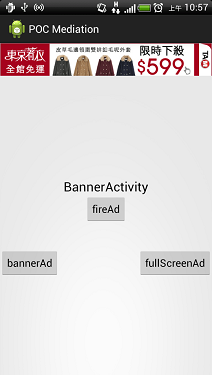
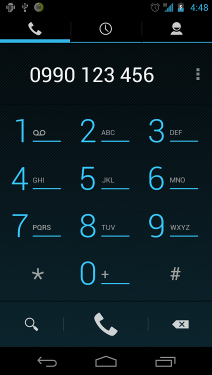
畫面展示
應用程式開啟 |
點擊Banner後開啟網頁 |
點擊Banner後撥打電話 |
|

|
|